

Web Demo - TEMPORARILY UNDER CONSTRUCTION

AquaModel - now a plug-in of EASy
See it in Action






This online system is a simplified version of the mariculture simulation package.
Click Here to launch our NetViewer visualization!
(See Browser Requirements and Instructions below)
Click Here to launch our new GoogleEarth visualization!
The full package includes various settings and controls to change the size, shape, orientation, stocking density, ambient water temperature, nitrogen and oxygen conditions, feed rates, turbulence, downstream dispersion, vertical stratification, water velocity and direction, simulated or site specific current velocity and many other factors necessary or desirable to simulate farm operation and effects on the environment.
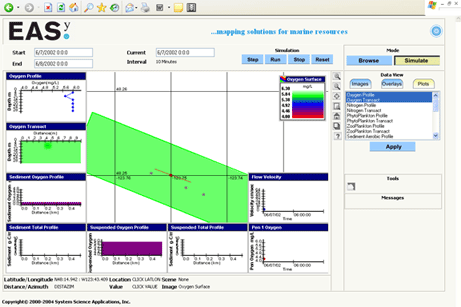
The application that you are about to view will allow you to explore this simulation model interactively and graphically through a simple to use interface accessed via your Web-browser. These include:
Click Here to launch our NetViewer visualization!
(See Browser Requirements and Instructions below)
Click Here to launch our new GoogleEarth visualization!
The full package includes various settings and controls to change the size, shape, orientation, stocking density, ambient water temperature, nitrogen and oxygen conditions, feed rates, turbulence, downstream dispersion, vertical stratification, water velocity and direction, simulated or site specific current velocity and many other factors necessary or desirable to simulate farm operation and effects on the environment.
The application that you are about to view will allow you to explore this simulation model interactively and graphically through a simple to use interface accessed via your Web-browser. These include:
- 2-dimensional views of the waste plume produced by the farm at selected depths,
- 2-dimensional vertical transects or slices through the plume,
- 1-dimensional depth profiles at a given location, and
- Time series plots of current speed, the mean growth rate of fish, and the concentration of any variable within the farm
Browser Requirements:
AquaModel uses SSA's NetViewer which has been tested with the latest versions of six of the most popular browsers including: Microsoft Internet Explorer, Mozilla Firefox, Safari, Google Chrome, and Netscape.
Basic Instructions:
- Wait until page has loaded - this may take a while depending on your Internet connection. Note: If the map fails to load, check your browser settings - see Browser Requirements section below.
- The "Zoom In," "Zoom Out," "Zoom Window," "Zome Home" and "Re-center" buttons just to the right of the map allow you to change the view scale and focus.
- Click the "Step" or "Run" button from the simulation panel near the top to advance the temporal simulation one frame at a time or iteratively.
- Pause the simulation at any time by pressing the "Stop" button.
- Once the simulation is paused (you may have to zoom-out), double click on the red point label to get station information or an associated data in a pop-up browser window.
- Click the "Step" or "Run" button to resume the simulation, or click the "Reset" button to terminate the simulation.
- Use the right panels to select a variety of plot types and click "Apply" to activate them.
- You can also define custom views of data from Browse mode button, and then select any variables of interest listed and desired plot types available from the Image, Overlays, and (XY) Plot tab control.
- Comprehensive online help and a tutorial are available by clicking on the "?" button.
By accepting the following and using this application, the user agrees to the following:
1. Not to use data contained in this application in any publication without the written consent of the original data provider.
2. Not to use the data contained in the GIS System for any commercial or navigational purposes.

Above link temporarily under construction
Please note that for the GIS to work your browser must be set configured with "Medium" security settings.
Launch here if the above image link doesn't show up.
Please note that for the GIS to work your browser must be set configured with "Medium" security settings.
Launch here if the above image link doesn't show up.